
Welcome to the magical world where corporate presentations transform from snooze-fests into captivating spectacles! If you think PowerPoint is just for putting people to sleep, think again! This guide is your ticket to crafting presentations that not only inform but also entertain, engaging your audience like they’re at a blockbuster movie premiere.
We’ll sprinkle in strategies for designing eye-catching slide decks, mastering the art of storytelling, and even diving into some industry-specific presentation techniques. Whether you’re pitching to investors or presenting risk management plans, we’ve got the tips and tricks to make your presentation shine brighter than your colleague’s new tie!
Corporate Presentation Strategies
Crafting an impactful corporate presentation is akin to orchestrating a symphony—each slide, a note; each point, a crescendo. With the right strategies, you can captivate your audience and ensure your message resonates long after you’ve exited the stage. Let’s delve into the art and science of creating presentations that not only convey information but also spark inspiration and engagement.
Design a Captivating Slide Deck for a Corporate Presentation
The design of a slide deck is crucial in setting the tone for your presentation. A beautifully crafted deck can serve as a powerful ally in conveying your message effectively. When designing your slides, consider the following elements that can enhance visual appeal and engagement:
- Consistent Branding: Use your company’s colors, fonts, and logos to create a unified look across all slides. This not only reinforces brand identity but also helps the audience feel more connected to the content.
- Visual Hierarchy: Utilize size and color to guide your audience’s attention to the most important information. Bold headlines and contrasting colors can help key messages stand out.
- High-Quality Images: Incorporate relevant, high-resolution images that complement your message. A compelling image can evoke emotions more powerfully than text alone.
- Minimal Text: Adopt the 6-6 rule: no more than six words per line and six lines per slide. This keeps your audience focused and prevents information overload.
- Engaging Charts and Graphs: Present complex data visually. Infographics and charts can simplify statistics and trends, making them more digestible and memorable.
Effective Storytelling Techniques to Engage an Audience
Storytelling in presentations transforms dry data into relatable narratives that resonate with audiences on a personal level. By intertwining your message with stories, you can make your presentation more engaging and memorable. Incorporating storytelling techniques involves:
- Relatable Characters: Introduce characters that your audience can identify with. These can be customers, employees, or even fictional personas that represent your target demographic.
- Conflict and Resolution: Every good story has a conflict that needs resolution. Present challenges and how your product or service addresses them, allowing the audience to see the value in what you offer.
- Emotional Appeal: Use anecdotes to elicit an emotional response. Share successes or failures that reflect the human experience and foster a connection with your audience.
- Clear Structure: Organize your presentation like a story—beginning, middle, and end. This logical flow helps maintain audience engagement and clarity.
- Call to Action: Conclude your story with a compelling call to action. What do you want your audience to do after hearing your presentation? Make it clear, concise, and achievable.
Checklist for Preparing for a High-Stakes Business Presentation
Preparation is essential for delivering a confident and impactful presentation, especially in high-stakes situations. This checklist will help ensure that you are well-equipped to present your material effectively.
1. Content Mastery
Know your material inside out. Familiarity breeds confidence.
2. Audience Analysis
Understand who will be in the room—tailor your content to meet their interests, knowledge level, and needs.
3. Rehearsal
Practice your presentation multiple times, preferably in front of colleagues who can provide constructive feedback.
4. Technical Setup
Verify that all equipment, such as projectors and microphones, are functional and compatible with your presentation format.
5. Time Management
Time your presentation during practice runs to ensure you stay within the allotted timeframe.
6. Visual Aids
Prepare all slides and materials ahead of time. Ensure they are clear and professional.
7. Emergency Plan
Have a backup plan for technical failures. Bring printed copies of your slides and familiarize yourself with alternatives.
8. Mindfulness Techniques
Incorporate breathing exercises or visualization techniques to calm nerves before stepping on stage.
9. Dress for Success
Choose an outfit that reflects professionalism and boosts your confidence.1
0. Follow-Up Strategy
Be ready to engage with your audience after the presentation. Have materials or information ready for those who express interest.By following these guidelines, you can elevate your corporate presentations to new heights, ensuring your audience leaves not just informed, but inspired and ready to act.
Enhancing Business Productivity through Presentations
In the high-speed chase of corporate life, presentations are the speedy sports cars that can either take you to the finish line or spin you out of control. Enhancing business productivity through presentations is less about dazzling PowerPoint transitions and more about strategic preparation and effective communication. By focusing on streamlining preparation, incorporating data visualization, and measuring effectiveness, businesses can turbocharge their output and drive results that even the most caffeinated employee would applaud.
Streamlining Presentation Preparation for Businesses
To ensure that the presentation process doesn’t feel like a marathon with no finish line, it’s essential to adopt methods that simplify and expedite preparation. Here are some efficient strategies:
- Template Utilization: Create and maintain a library of customizable presentation templates. This not only saves time but also ensures brand consistency, so your logo doesn’t end up looking like it’s gone through a funhouse mirror.
- Collaboration Tools: Use collaborative software platforms like Google Slides or Microsoft Teams. They enable team members to contribute ideas and edits simultaneously, making the process feel more like a harmonious jam session than a chaotic band practice.
- Time Limits: Set strict time limits for each stage of preparation. This encourages focus and efficiency, transforming the presentation into a well-oiled machine rather than a procrastination-fueled zombie.
Incorporating Data Visualization to Boost Productivity
Data without visuals is like a cake without frosting—lacking appeal and often hard to digest. To truly enhance productivity, incorporating compelling data visualization techniques is key. This allows your audience to grasp complex information quickly and retain it longer. Here are effective visualization strategies:
- Infographics: Combine images, charts, and concise text to provide a snapshot of key metrics. Infographics can turn dry statistics into engaging stories, drawing your audience into the narrative.
- Interactive Charts: Utilize tools that allow for interactive data displays. Viewers can explore the data at their own pace, much like navigating through a buffet; they can pick and choose what intrigues them the most.
- Color Coding: Use a consistent color scheme to categorize different types of information. This not only aids in memory retention but also makes your slides visually appealing—because no one wants to stare at a rainbow explosion of confusion.
Measuring the Effectiveness of Business Presentations
To determine if your presentation strategies are hitting the mark, measuring their effectiveness is crucial. Implementing a framework for evaluation will help refine future presentations and enhance overall productivity.
- Feedback Surveys: After each presentation, distribute quick surveys to attendees. Include questions about clarity, engagement, and takeaway value. This is like having a backstage pass to the audience’s minds.
- Follow-Up Metrics: Track any changes in productivity or engagement levels post-presentation. This could include monitoring sales figures, project initiation rates, or teamwork dynamics. Are you seeing results, or did the presentation flop like a fish out of water?
- Presentation Analytics: Utilize software that tracks viewer engagement metrics during the presentation. Observing which slides garnered the most attention can help in refining content for future audiences.
“A presentation is not just about speaking; it’s about making an impact that resonates long after you’ve left the room.”
Industry-Specific Presentation Techniques
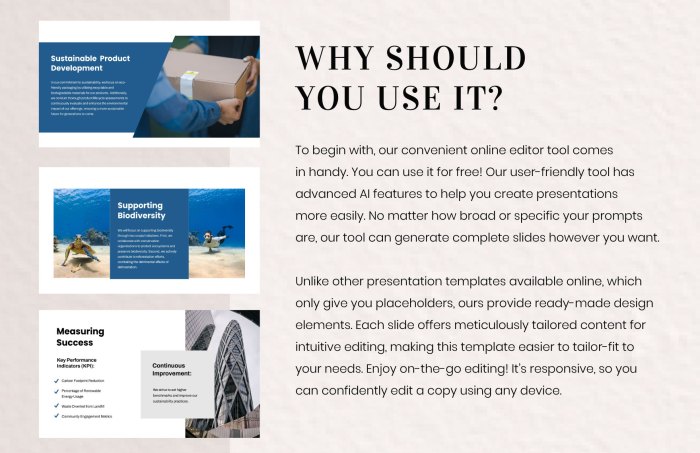
In the fast-paced world of business, tailoring presentations to specific industries can make all the difference. Whether you’re serving up sizzling steak to restaurant-goers or showcasing the latest retail trends, the right presentation strategy can elevate your message. Prepare to dive into unique techniques that cater to the nuances of the restaurant industry, the retail sector, and the often-overlooked realm of risk management in corporate settings.
Buckle up; it’s going to be a flavorful ride!
Unique Presentation Ideas for the Restaurant Industry
In the restaurant industry, your presentation should be as appetizing as the dishes you serve. Captivating your audience means more than just slides; it’s about creating a full sensory experience. Here are some ideas to spice up your restaurant presentations:
- Menu Tasting Sessions: Nothing beats a live demo! Bring samples of your dishes to the presentation, allowing your audience to taste your culinary creations as you discuss their ingredients and preparation.
- Visual Storytelling: Use mouth-watering imagery of your dishes and behind-the-scenes videos of your chefs in action. This not only engages the audience but also builds a narrative around your brand.
- Interactive Elements: Incorporate polls or quizzes about food preferences or dining habits. This not only keeps the audience engaged but also provides valuable insights into consumer trends.
- Themed Presentations: Why not match the presentation theme to your menu? For instance, if you’re presenting Italian cuisine, create a “Little Italy” ambiance with decor, music, and even props like wine bottles or pasta.
Guiding Presentations for Retail Business Audiences
Retail presentations need to resonate with both the data-driven and the creative sides of your audience. Tailoring your content to highlight trends, consumer behavior, and product placement is essential. Here’s how to keep your retail audience engaged:
- Market Insights: Start with current market trends and statistics. Use graphs and charts to visually represent sales data and consumer behavior shifts.
- Product Demos: Showcasing products live can significantly impact audience interest. Allow potential buyers to feel and interact with the merchandise during your presentation.
- Customer Testimonials: Sharing stories from satisfied customers can create emotional connections. Use video testimonials for maximum impact.
- Future Predictions: Incorporate forecasts for your industry and explain the strategies that your business will use to adapt to upcoming changes. This builds trust and credibility.
Strategies for Presenting Risk Management Plans in a Corporate Setting
Risk management may not be the most glamorous topic, but it’s crucial for business stability. To present these plans effectively, focus on clarity and actionable insights. Here are some key strategies:
- Clear Framework: Structure your presentation around a clear framework: identify risks, assess impact, and Artikel response strategies. This format provides a logical flow that is easy for your audience to follow.
- Visual Data Representation: Use infographics and charts to break down complex data related to risks. This makes your points more digestible and engaging.
- Real-Life Case Studies: Share examples of companies that successfully navigated risks. Analyze their strategies and outcomes to provide real-world relevance.
- Engagement Through Scenarios: Present hypothetical risk scenarios and ask your audience how they would respond. This interactive approach not only engages them but also highlights the importance of proactive risk management.
Last Recap
In conclusion, transforming your corporate presentations from mundane to magnificent is all about creativity, preparation, and a sprinkle of humor. By embracing innovative strategies and understanding your audience, you can ensure your message is not just heard, but also remembered long after the projector is turned off. Now, go forth and dazzle your audience like the presentation rockstar you are!
Helpful Answers
What are some quick tips for engaging an audience?
Start with a compelling story, use striking visuals, and interact with your audience through questions or polls.
How can I make my presentation more visually appealing?
Use high-quality images, limit text on slides, and maintain a consistent color scheme to keep it visually engaging.
What should I do if I lose my audience’s attention?
Incorporate a fun fact, ask a thought-provoking question, or involve them in a quick activity to regain their focus.
How can I tailor my presentation for different industries?
Research industry-specific trends and challenges, and adjust your content and examples to resonate with your target audience.
What common mistakes should I avoid in presentations?
Avoid reading slides verbatim, overloading slides with text, and neglecting to practice your delivery beforehand.


